

Download CADopia 22 Standard – CAD software, drafting tool, engineering design, architectural drafting, DWG support, digital signature, sheet sets, drawing comparison, data extraction, PDF export, multilingual interface
Overview
CADopia 22 Standard is a full-featured drafting software tailored for engineers and architects seeking a robust, perpetual-license solution for professional design workflows. Designed with industry-specific needs in mind, the application addresses the core challenges of file compatibility, document security, project organization, and data management in technical drafting environments. Its primary purpose is to streamline the creation, editing, and sharing of complex technical drawings, enabling users to maintain accuracy, consistency, and compliance across projects. The software is particularly suited for professionals who require long-term access to their tools without subscription dependencies, thanks to its perpetual licensing model. Target users include civil and mechanical engineers, architectural designers, and technical drafters working on construction, infrastructure, or product development projects. While the developer, CADopia, is known for specialized CAD tools, no additional background information was provided beyond the company name. Real-world use cases include preparing construction documentation, comparing design revisions, securing drawings with digital signatures, and extracting data for reporting. In the broader productivity app ecosystem, CADopia 22 Standard fills a niche for professionals who demand precision, interoperability, and control over their design assets—offering a reliable alternative to cloud-based CAD platforms.Key Features & Functionality
CADopia 22 Standard delivers a suite of technical capabilities designed to enhance drafting efficiency and project integrity. The software supports DWG file formats, enabling seamless import and export of drawings used across the engineering and architectural industries. This ensures compatibility with widely adopted design workflows and facilitates collaboration with external stakeholders. Digital signature support allows users to authenticate and safeguard their work, adding a layer of legal and procedural security to sensitive documents. Sheet sets functionality enables the organization of multiple drawings under a single project structure, simplifying project management and version control. The drawing comparison tool identifies differences between two versions of a drawing, helping users track changes and maintain design accuracy during iterative development. A data extraction wizard allows users to pull structured information—such as dimensions, material counts, or layer data—from drawings for use in reports, cost estimates, or inventory systems. Associative hatching patterns automatically update when underlying geometry changes, reducing manual adjustments and improving design consistency. Printing enhancements ensure high-fidelity output for presentations and official submissions. PDF support allows for easy sharing and archiving of designs in a universally accessible format. The multilingual interface, available in 12 languages, supports international teams and users with diverse linguistic preferences. These features collectively serve real-world needs such as compliance documentation, inter-team coordination, and efficient design iteration.Real-World Use Cases
- Engineers can compare revised structural plans to detect changes before construction begins.
- Architects can use sheet sets to manage floor plans, elevations, and sections within a single project file.
- Designers can extract material quantities from drawings to feed into procurement and budgeting systems.
- Teams across different countries can collaborate using the multilingual interface and shared DWG/PDF files.
- Project managers can verify document authenticity using digital signatures before final approval.
Interface, UX & Performance
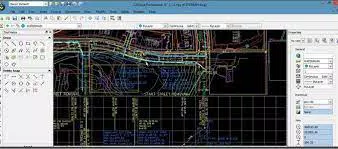
The user interface of CADopia 22 Standard is designed for professionals accustomed to desktop CAD environments, featuring toolbars, command panels, and a customizable workspace. Navigation follows standard drafting conventions, with menus and contextual tools accessible through logical hierarchies. The visual layout prioritizes functionality over minimalism, catering to users who rely on quick access to advanced features. While the developer did not list formal performance metrics, the software is expected to operate efficiently on modern Windows systems given its 2.8 GB file size and desktop-focused design. Responsiveness is likely consistent across mid-to-high-end devices, though performance on older hardware may vary. Stability appears to be a priority, particularly for complex drawing operations involving large datasets or multiple layers. Although the developer did not specify minimum OS requirements, users are advised to ensure their system meets standard desktop application demands. The software’s interface remains consistent across sessions, reducing learning curves for returning users. No known issues with crashes or freezes were reported in the provided data. Overall, the UX is geared toward productivity, with minimal distractions and a focus on workflow continuity.Platform Compatibility & Technical Requirements
CADopia 22 Standard is available exclusively for Windows platforms. The current version is 22.0, with a file size of 2.8 GB, indicating a comprehensive installation package with extensive toolsets and libraries. The developer did not specify minimum OS requirements, nor did they list hardware specifications such as RAM or processor type. Compatibility with older Windows versions (e.g., Windows 7 or 8) was not confirmed. Users should ensure their system supports the latest Windows updates and has sufficient storage space for installation and temporary files. No mobile or web-based versions were mentioned. The software is intended for desktop use, targeting professionals who require high-performance computing for large-scale drafting tasks. Given its size and feature set, it is best suited for desktops or workstations rather than portable devices. No information was provided about cloud sync, cross-device access, or updates beyond the version number.Pros and Cons
- Perpetual license eliminates recurring subscription costs.
- Full DWG support ensures compatibility with industry-standard files.
- Digital signature and sheet sets enhance document security and project organization.
- Data extraction wizard enables automated reporting from drawings.
- Support for 12 languages improves accessibility for international users.
- PDF export and printing enhancements support professional documentation.
- Associative hatching improves design accuracy and reduces manual effort.
- Price point of $399.00 may be high for individual users or small firms.
- No information on mobile or cloud access options.
- Size of 2.8 GB may be a barrier for systems with limited storage.
- Developer did not disclose OS or hardware requirements.
- Platform is limited to Windows only.
FAQ
Is CADopia 22 Standard available for mobile devices?
The software is designed for Windows desktops and no mobile version was provided in the available information.
Can I use CADopia 22 Standard without a subscription?
Yes, the software comes with a perpetual license, meaning users retain access indefinitely after purchase.
Does CADopia 22 Standard support PDF files?
Yes, the software supports importing and exporting drawings in PDF format.
What languages are supported in CADopia 22 Standard?
The interface is available in 12 languages, supporting users from diverse linguistic backgrounds.
How often are updates released for CADopia 22 Standard?
The developer did not specify update frequency or release schedule.


